Background
At Walker's Doughnuts, the things that made a shift run well were rarely written down. A manager knew how to handle a rush, and a senior staff member knew the fastest way to prep for the morning, and none of it survived when that person wasn't rostered on. Around the same time, our store slid from one of the better performers in the franchise toward the bottom of the leaderboard, and staff turnover was high. I can't say the ranking drop was caused solely by knowledge loss, but I saw first hand how much operational knowledge disappeared every time someone left.
Problem
Operational knowledge, standards, training, and workflows fragment across locations and staff, and disappear when someone leaves.
Solution
A shared operations platform for tasks, scheduling, procedures, tools, and staff coordination, captured once, reused by every shift.
Why I built it
“The success of one location should strengthen every location.” I didn't set out to build a SaaS product. I set out to fix this at one store, and FriendChise is still running that store today.
Product overview
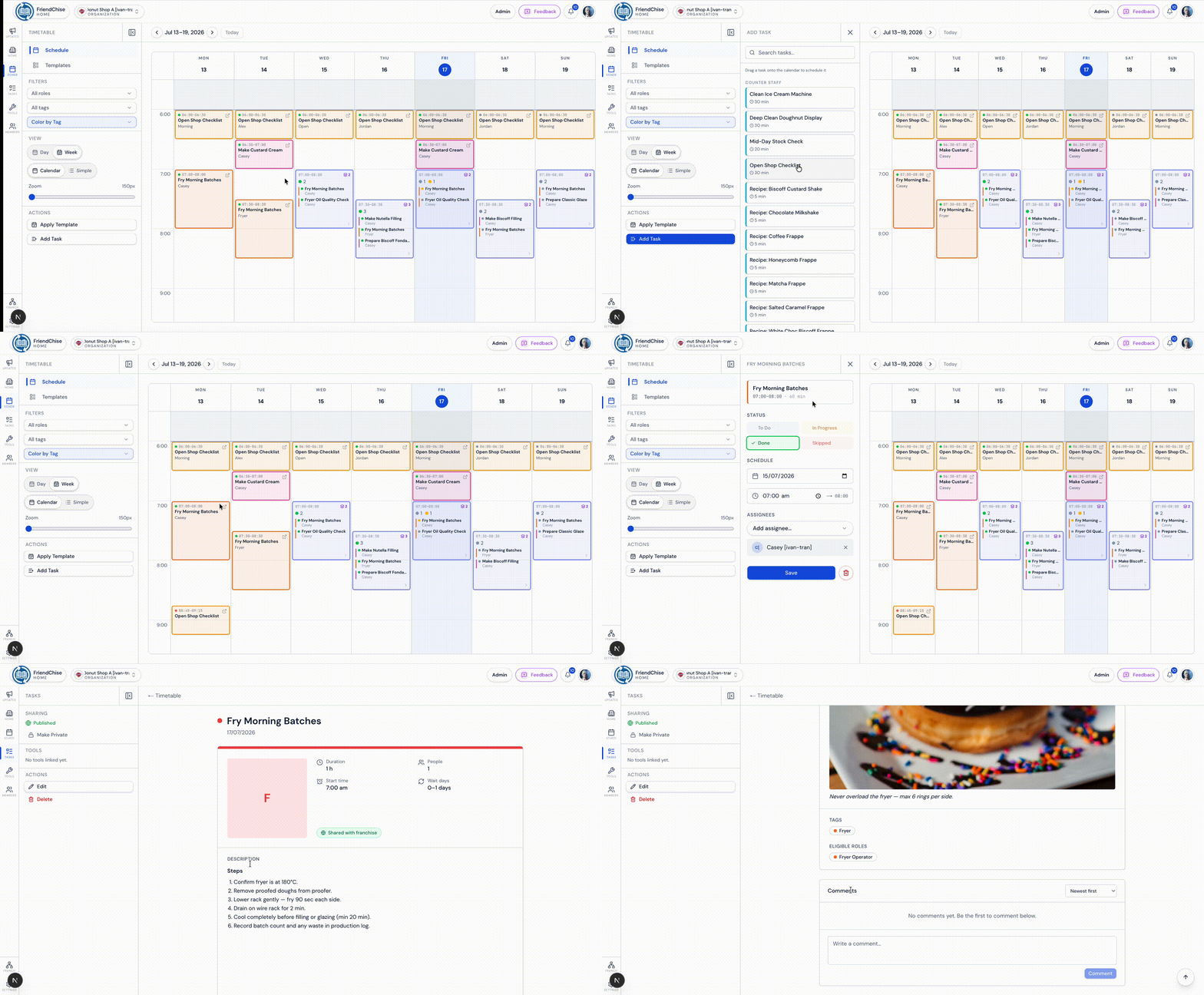
Timetable, tasks, procedures, and tools are built as separate systems sharing one organisation scoped data layer, so screenshots below reflect what a real shift actually sees.
Run the week
Weekly and daily scheduling so staff know what they're doing without asking a manager. Overlapping shifts and roles are grouped into readable cards instead of a wall of stacked entries, which removes the constant "what am I doing today" interruptions that used to eat into a manager's time.
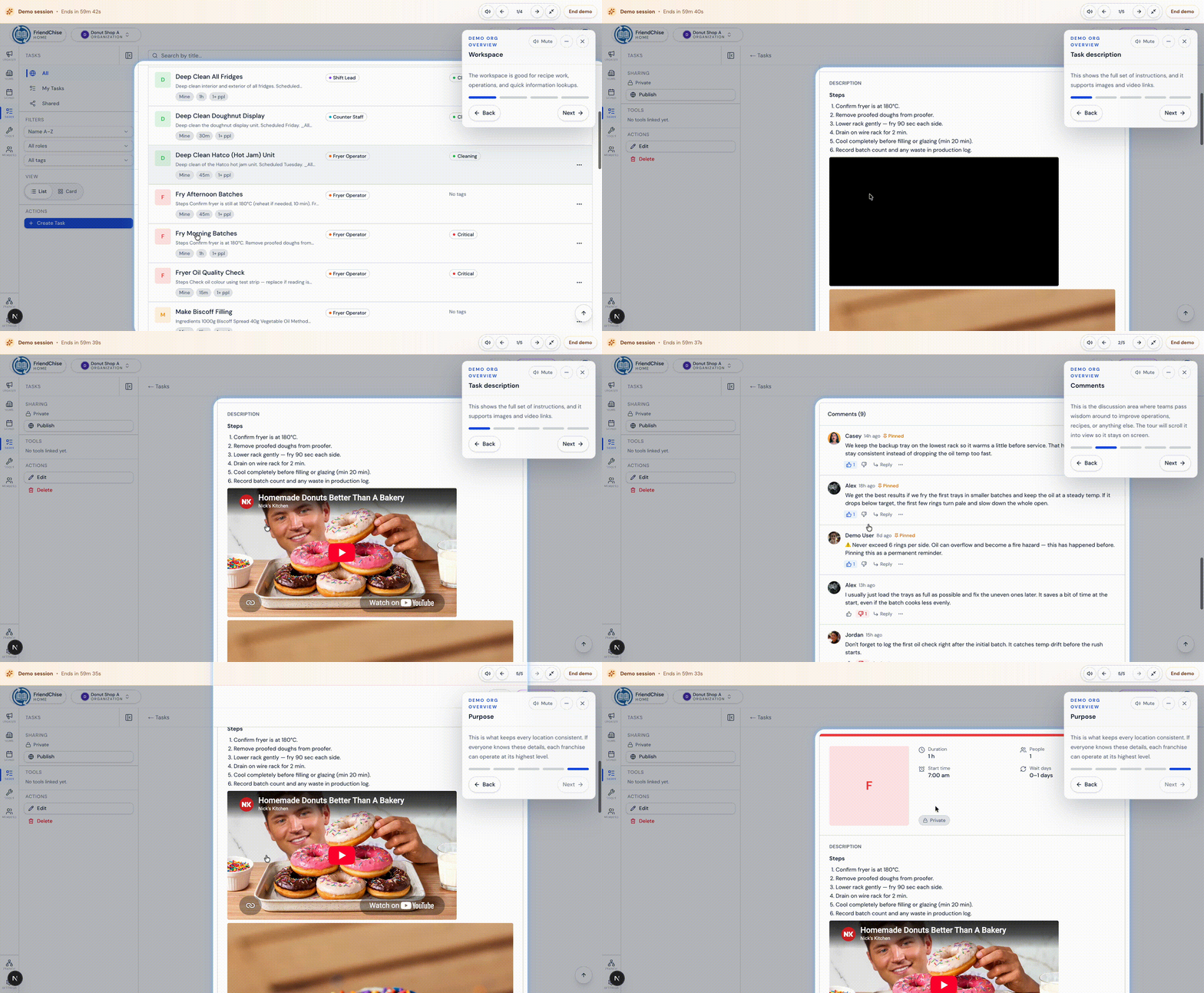
Standardise operational knowledge
Recurring tasks, prep procedures, and recipes that used to exist only on paper or in someone's head are written once and searchable by anyone on shift. Tags, comments, and recurrence rules turn a scrap of tribal knowledge into something the whole team can trust.
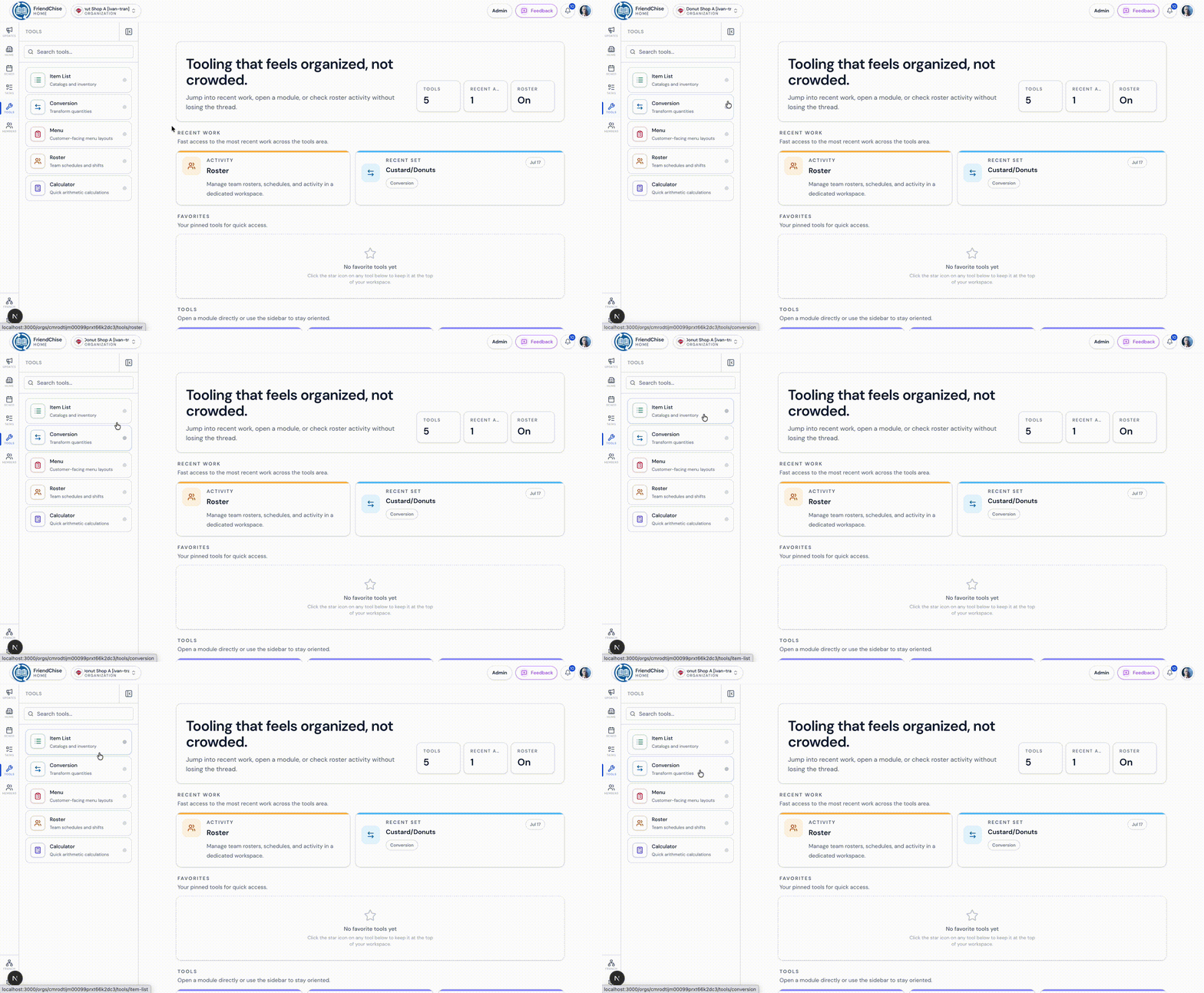
Train and support staff
Conversion tools, operational calculators, and item lists remove repetitive manual math from day-to-day work, the kind of thing that seems minor until you're the one doing it by hand every shift, and a big part of onboarding someone new quickly.
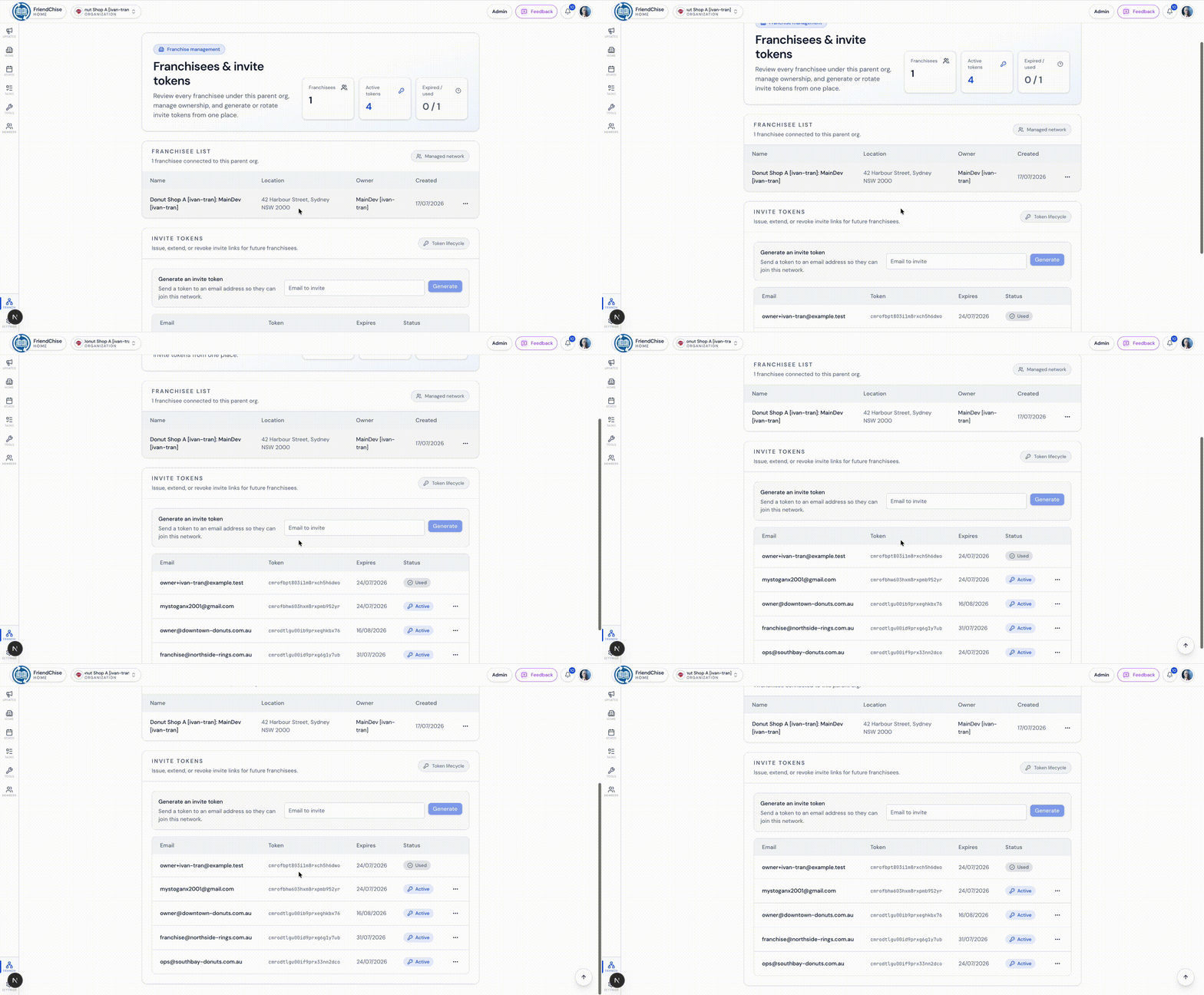
Coordinate across locations
Each location runs as its own organisation with its own staff, schedule, and data, while a parent organisation can connect multiple franchisees and share brand level resources, the structure the platform needs before it can grow past one store.
Founder & Full Stack Developer
Solo designed, built, and maintained, extended by open source contributors
Ownership and Responsibilities
I built and maintain FriendChise independently, owning the product direction, architecture, implementation, and ongoing development.
- Product discovery and requirements gathering directly with the staff who use the system
- UI/UX design in Figma, full stack development, and API design
- Database modelling, the 55-model Prisma data schema and its migrations
- Multi tenant architecture, RBAC, and permission design
- Test strategy across unit, integration, and full workflow suites
- Deployment, CI/CD, error monitoring, and rate limiting
Open Source Maintenance
The project has grown to open source contributors. I review incoming contributions while continuing to lead the architecture, product direction, and production quality.
Request Flow
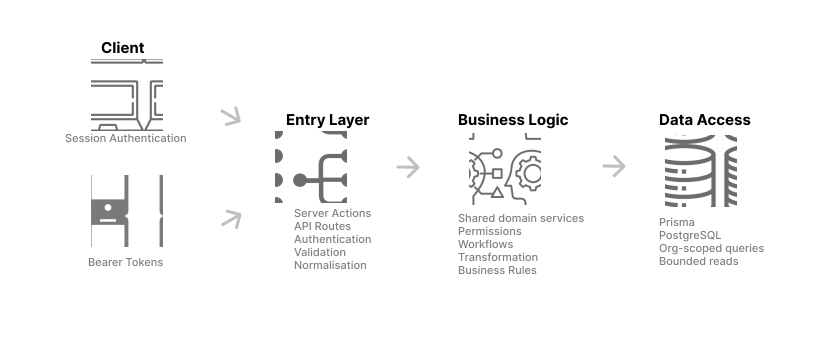
Web and mobile requests enter through different transport mechanisms, but both authenticate, validate and normalise input before calling the same shared business logic.
Architecture Principle
Server Actions and API routes are transport layers, not separate implementations of the product logic. Both authenticate and validate requests before calling the same shared business logic, which then accesses organisation scoped data. This keeps web and mobile behaviour consistent, avoids duplicated rules, and makes security and performance constraints easier to enforce.
Web and mobile use different authentication mechanisms, but both resolve into the same application logic and organisation context. This allows the two clients to share the same behaviour and data rules while presenting the information differently for desktop and mobile layouts.
- Entry Layer: protects the application boundary and converts different client requests into clean, trusted input.
- Business Logic: focuses on correctness and efficiency, permissions, workflow rules, and returning the right amount of data rather than HTTP/API details.
- Data Access: ensures database queries only access the correct organisation’s data, return a limited amount of data, and keep reads and writes controlled.
Frontend Architecture
Each page acts as the main coordinator for its feature. It loads the primary data needed for the initial render on the server, then passes only the relevant data into smaller components responsible for presentation and interaction. When a component needs additional data after the page has loaded, such as for pagination, infinite scroll or on-demand updates, it can request that data through an API route.
Page / Server Components- Load the main data needed for the initial render.
- Structure the page.
- Pass only the relevant data into feature components.
Feature / Client Components- Turn that data into interactive UI.
- Handle local interaction and presentation.
- Can request additional data when needed.
- Examples: pagination, infinite scroll, refreshes, on-demand requests, auth-derived UI state such as
isParent.
Shared UI Components- Reusable navigation, sidebars, dialogs, controls and repeated UI patterns.
- Implemented once and reused across pages.
- Keep behaviour and styling consistent.
- Reduce duplicated code and make future changes easier.
Design Before Implementation
Major workflows are designed in Figma before implementation. This is used to define layout, interaction and responsive behaviour, but also to identify reusable patterns and component boundaries before code is written, so components aren't created ad hoc and duplicated later.
Runtime Controls
- Authentication
- Auth.js/session-based auth for web, bearer/JWT-style tokens for mobile
- Access Control
- RBAC and organisation scoping
- Validation
- Zod validation and input normalisation
- Query Safety
- Bounded reads with pagination/infinite-scroll support
- Rate Limiting
- Upstash Redis
- Error Monitoring
- Sentry
- Application Logs
- Server and deployment logs used for debugging
- Product Analytics
- User counts, customer/QR scans, feedback and demo usage
- Data
- Prisma, PostgreSQL, Supabase
- File Storage
- Supabase Storage
- Delivery
- GitHub Actions CI, Vercel
File Storage Controls
Uploads are validated before reaching Supabase Storage so the application only accepts file types and sizes that its workflows can process reliably.
- General image uploads: limited to supported image formats and a 5 MB maximum to keep uploads lightweight and predictable.
- AI supported scan to task: supports additional mobile formats such as HEIC and HEIF where required, because device generated files need explicit handling before they can be processed reliably.
- Storage access: handled separately from relational database access, with its own validation and access rules.
Multi Tenant Model
Franchise hierarchyOrganizations connect directly with their parent/child Organizations, so a franchisee stays independent while a parent can connect and manage multiple locations.
Access controlAccess flows from Membership to MemberRole to Role to Permission, all scoped to one Organization, so access never crosses tenant boundaries.
Organisation scoped resourcesTasks, timetables, rosters, tools, and menus each carry an orgId, so every query is scoped at the data layer, not the UI.
Data model55 Prisma data models covering auth, organisations, tasks, scheduling, rostering, tools, menus, comments, and admin/audit data.
200+Business logic & validation
150+Server actions
60+Integration tests with PostgreSQL
FriendChise uses automated testing and CI checks to protect critical workflows, access control, and production quality. Testing is concentrated on areas where failures could expose organisation data, bypass role permissions, or break important workflows.
Quality Gates
Every pull request runs automated checks through GitHub Actions, helping maintain the same quality standard for my own changes and external contributions.
TypeScript type checking
Catches invalid assumptions before runtime
Linting
Maintains consistent code quality
Vitest
Tests business logic, validation, helpers and server behaviour
Integration tests
Verify behaviour against a real PostgreSQL database
Playwright
Tests critical user workflows from start to finish
Access control tests
Verify protected routes, organisation boundaries and role specific permissions
Particular attention is given to role protected features, protected routes, organisation scoped data, and actions that should only be available to authorised users.
Pilot Metrics
Real usage across staff workflows, customer interactions, and public product exploration. Beyond the usage numbers, FriendChise has made everyday operations easier to maintain, teach, and share across the team.
300+
Customer QR Scans (in a month)
30+
Paper Processes Replaced
- Impact area
- What changed day to day
- Less paper to maintain
- Tasks, procedures and recipes are stored digitally instead of relying on printed sheets that can be lost, damaged or become outdated.
- Version history
- Older versions of procedures and recipes can still be reviewed when needed, giving staff a reference point when processes change.
- Easier onboarding
- New staff can access procedures, recipes and task instructions directly instead of depending entirely on another staff member being available to explain them.
- Shared questions and knowledge
- Comments let staff ask questions against the relevant task or procedure, allowing useful answers to remain visible for other staff who may have the same question later.
- Customer self-service
- The QR menu gives customers a simple way to view menu items from their own device.
- Safe product exploration
- The public demo has improved over time so visitors can explore FriendChise workflows and understand the product without affecting production data.