
FriendChise Mobile
Mobile access to FriendChise for frontline staff
React Native companion to FriendChise for frontline staff, with org-scoped tasks, tools, and Scan-to-Task drafts.
Live on the App Store
Overview
Project Overview
FriendChise Mobile brings FriendChise's operational knowledge and task workflows directly to staff working on the floor. Instead of adapting the desktop management experience to a smaller screen, the app focuses on quick access to tasks, recipes, procedures, and workplace knowledge during a shift.
The goal is to reduce the number of interactions required to find or record information, while making native mobile capabilities, such as the camera, part of everyday operational workflows.
Why Mobile?
The web platform is better suited to planning, administration, scheduling, and managing operations from a larger screen. Mobile serves a different environment: staff may be moving around the store, checking a recipe mid-task, working with one hand, or capturing information directly from the physical workplace.
This led to a separate mobile experience built around shorter interactions, persistent state, higher information visibility, and native device capabilities, rather than simply reproducing the desktop interface.
Workflows
Feed-style task list
Staff need to understand tasks quickly while working without repeatedly opening detail pages.
Descriptions and important details are surfaced directly in the task list, making it behave more like an information feed.
Staff can scan and act on tasks with fewer taps and less navigation during a shift.
Context-preserving interactions
Mobile work happens in short bursts, and staff should not lose their place every time they return to the app.
The app remembers where the user left off, and in selected workflows the keyboard dismisses after inactivity so screen space returns to the task, recipe, or procedure being viewed.
The interface stays focused on the content, reducing interaction friction on a constrained mobile viewport.
Camera-assisted knowledge capture
Printed procedures, recipes, documents, and other operational material still need to become structured knowledge inside FriendChise.
Staff can photograph that material and pass it through Scan-to-Task, which extracts the information into a task draft or knowledge entry.
Useful operational information can be captured on the floor and fed back into FriendChise without switching to a desktop workflow.
Workflow Walkthroughs
Task Feed
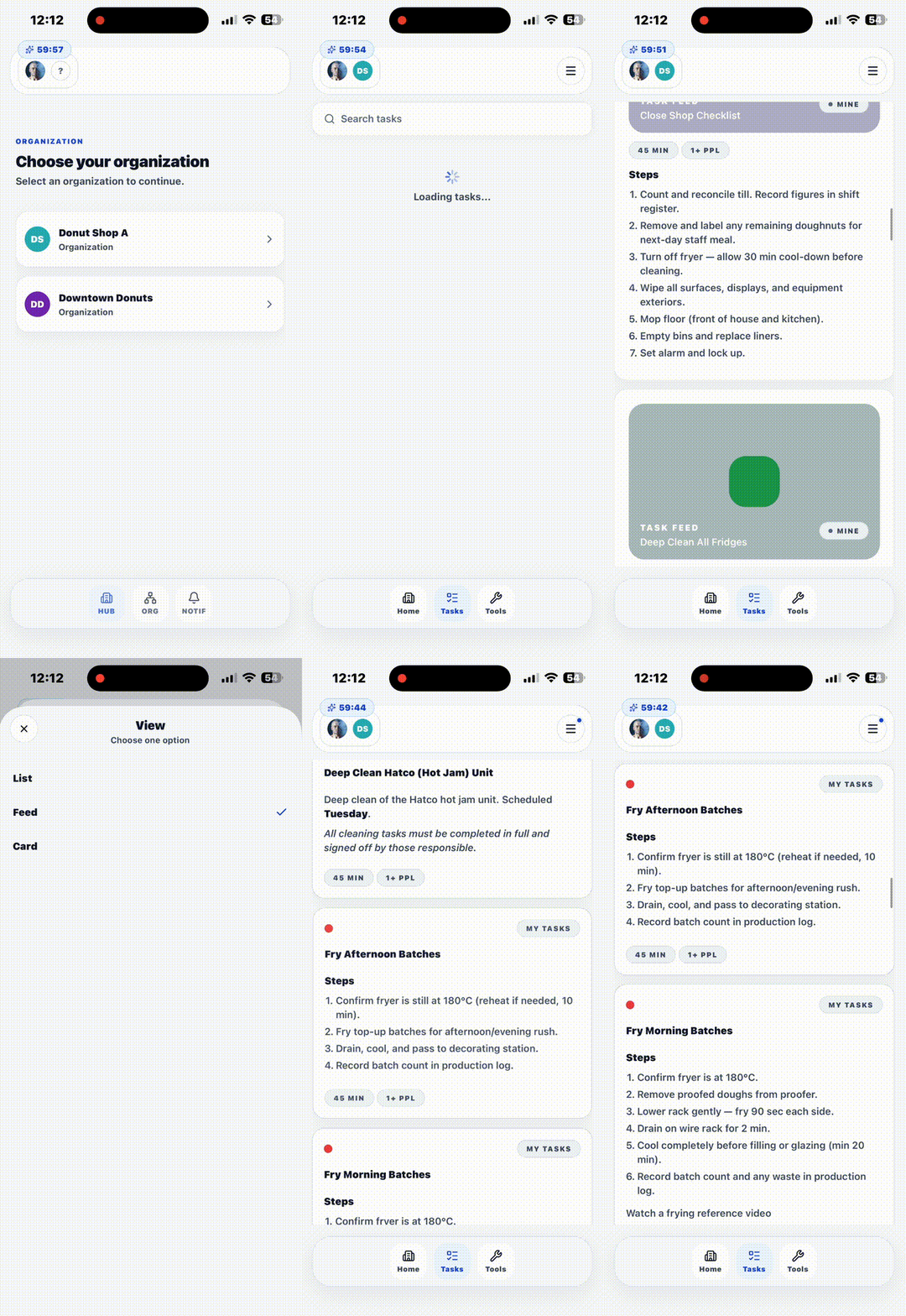
Scrollable task feed with instant search.
AI-Assisted Tool
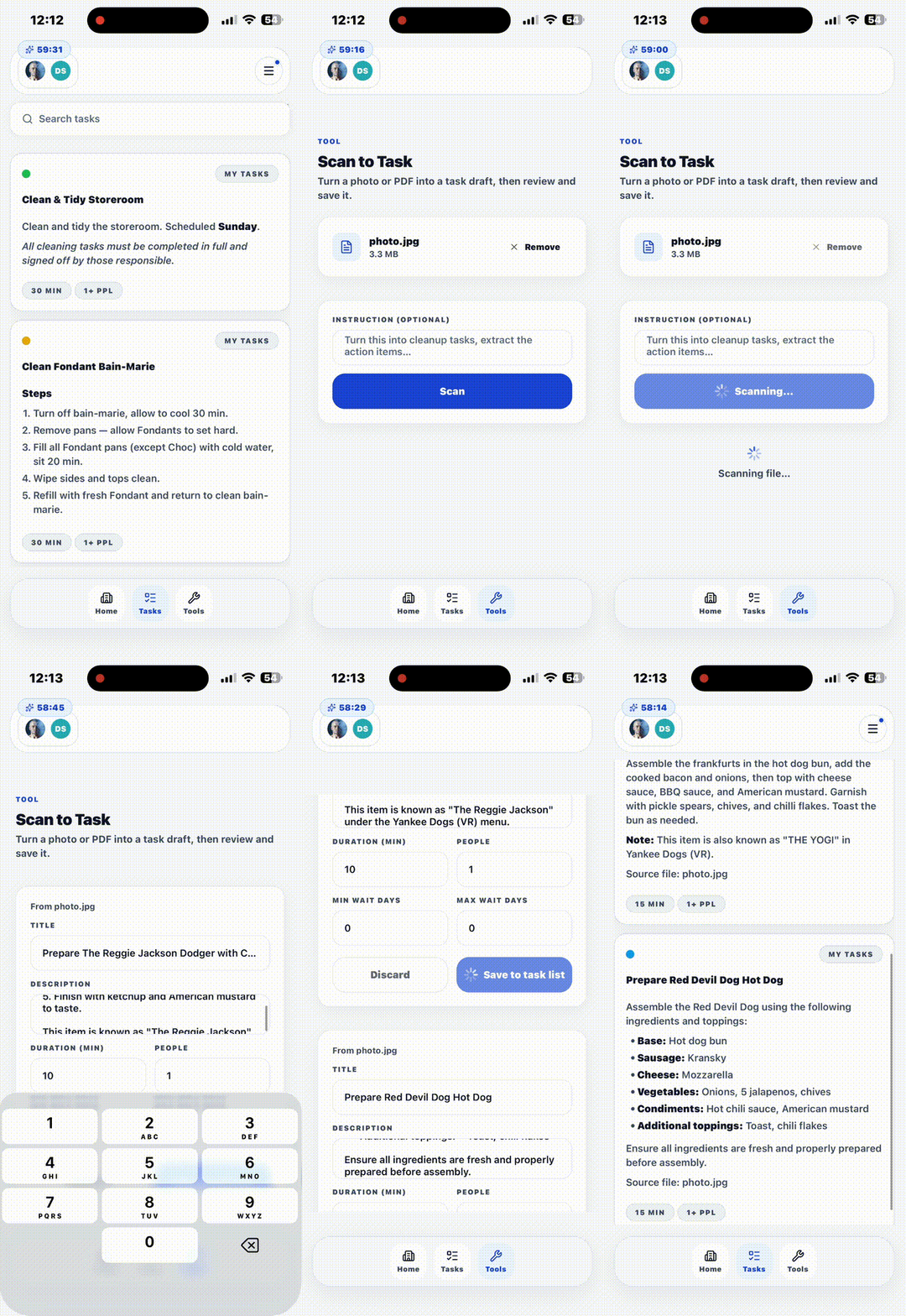
AI-assisted capture adds info to the list fast.
Demo Access
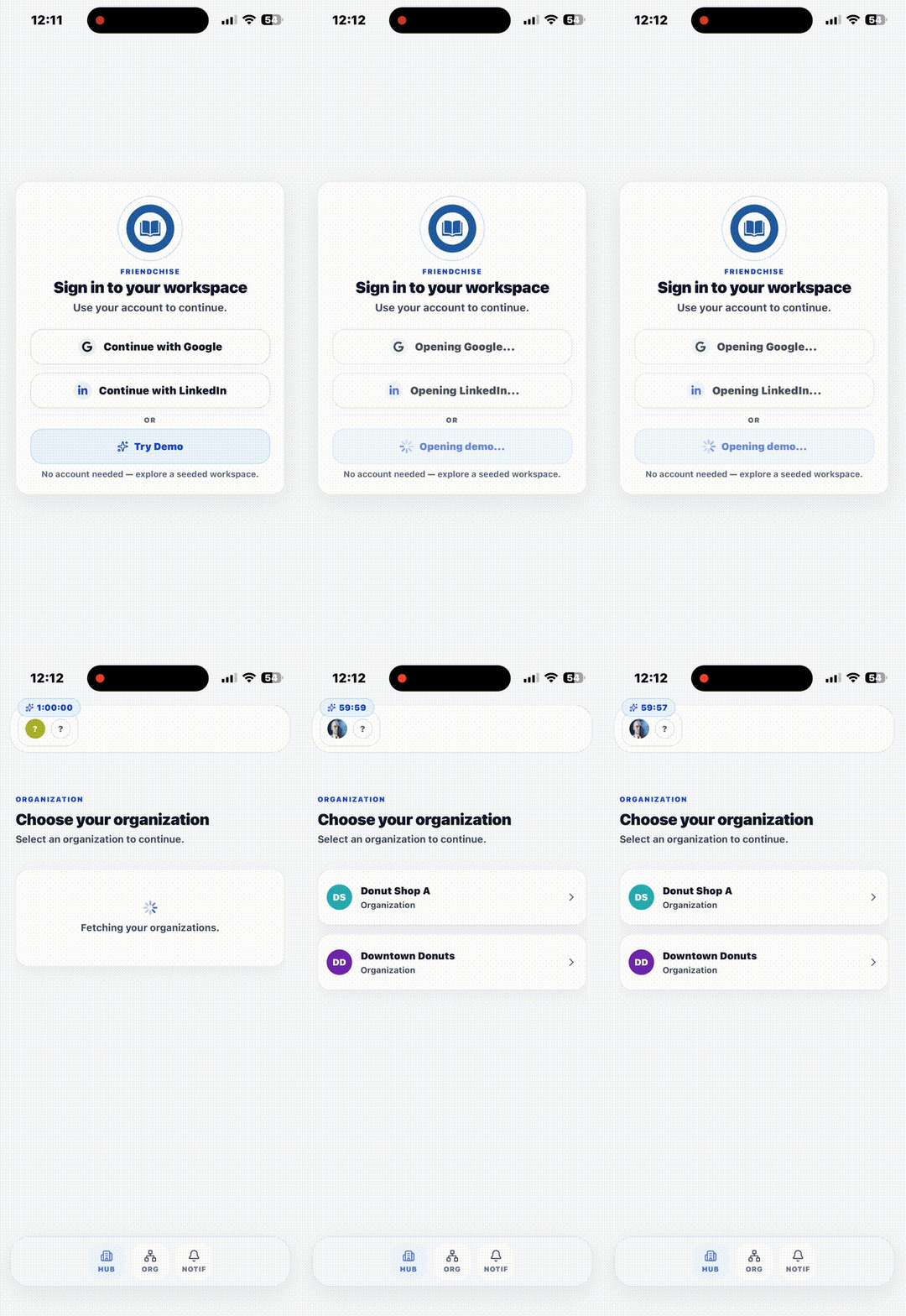
Sign-in via Google, LinkedIn, or an instant demo login open to anyone.
Architecture
System Overview
FriendChise Mobile is a separate native client focused on native interaction and smaller-screen workflows.
Shared Backend
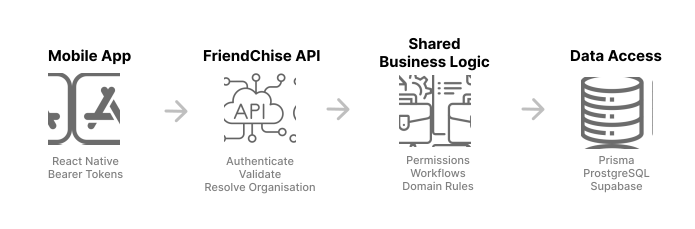
FriendChise Mobile shares the same backend, permissions, business logic and data layer as the web application.
Authentication
Web sessions and mobile requests reach the backend differently but resolve to the same place. The web client uses session-based authentication, while mobile uses a bearer token issued after OAuth. Both resolve to the same backend user, membership, and organisation context, so the same permissions and business rules apply regardless of which client made the request.
Client State & Data
Server data is fetched and cached through a query layer, so screens request only the data they need rather than loading the entire product state up front. Local component state handles interactions specific to a screen, and the session is persisted securely on-device between launches. When data goes stale or the app reconnects, the affected screens refetch rather than trusting an old snapshot.
Native Integrations
Native device concerns are handled by the mobile client, while validation, permissions, and product rules remain shared with the backend.
- Camera access and photo/document capture
- Document and file selection for uploads
- Deep linking and OAuth handoff back into the app
- Native secure storage for session persistence
Scan-to-Task Pipeline
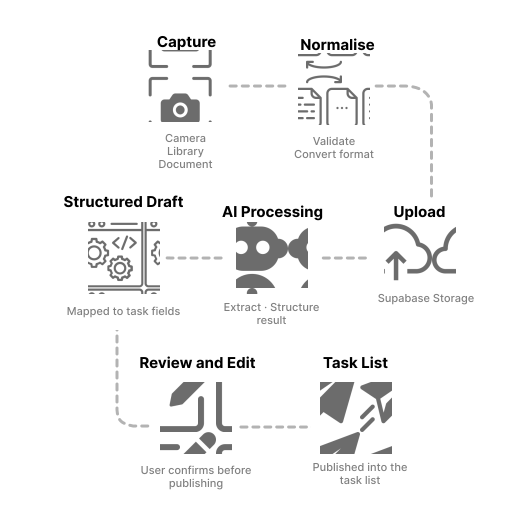
Scan-to-Task Workflow
The user provides a photo from the camera, photo library, or a document file.
Validate file type and size, and convert unsupported formats before upload.
Send the prepared file to Supabase Storage through the existing FriendChise backend.
Send the uploaded content through the AI-assisted processing pipeline to extract and structure task information.
Map the AI result into FriendChise task fields rather than leaving it as unstructured text.
Run the required checks, then allow the user to review and edit the generated task before publishing.
Once confirmed, save the task so it becomes available in the normal FriendChise task list.
Engineering Challenges
OAuth handoff on a native app
A plain browser tab can lose the "user activated" state across Google's multi-hop redirect chain, so the final redirect back into the app sometimes renders as a web page instead of returning control to it.
Use ASWebAuthenticationSession (via expo-web-browser) instead of a Linking-based browser tab, with an attempt-ID guard so a stale OAuth attempt can't resolve after a newer one has started.
Google and LinkedIn sign-in hand off back to the app reliably, including when a user restarts the flow mid-attempt.
HEIC compatibility in the scan pipeline
iPhone photos (especially Portrait/Live/Burst shots) save as HEIC with embedded auxiliary images, and some variants aren't reliably decoded by the backend's processing pipeline.
Re-encode HEIC/HEIF to JPEG on-device with expo-image-manipulator before upload, and fall back to extension-based MIME detection for ambiguous file types.
The backend only ever receives a format its processing pipeline can handle.
Synchronising mobile session expiry
The mobile session is a signed server token the client has no reason to decode, so the app needs another way to know when to sign the user out.
The OAuth callback supplies an expiresAt timestamp separately, stored alongside the token in the auth store, and a session watcher schedules a single timer to clear the session at that boundary.
Session state stays consistent with the server-issued token's lifetime without any client-side token decoding.
Network resilience on mobile connections
Uploads and scan requests can hang or get abandoned mid-flow on a spotty store Wi-Fi connection, and large files waste time if they're rejected only after a slow upload finishes.
Data requests go through a shared authenticated fetch wrapper with a distinct AbortController reason for timeouts versus user cancellation, and Scan-to-Task checks the 15MB size cap on-device before any upload starts.
Failures surface a specific, actionable message instead of a generic network error, and oversized files never leave the device.
Technology Stack
Core Technologies
Mobile
React Native + Expo, Expo Router, TypeScript
Authentication
Sign in with Apple, Google & LinkedIn OAuth, Expo SecureStore
Data & State
TanStack Query, Zustand / AsyncStorage
Capture & Media
expo-image-picker, expo-document-picker, expo-image-manipulator
Backend / Platform
Shared FriendChise API, signed upload URLs
Quality & Release
ESLint / strict TypeScript, Vitest, EAS Build / Submit
Product Impact
Production Usage
FriendChise Mobile started on a shared TestFlight device at Walker's Doughnuts and is now available through the App Store for individual staff installs. This gives staff direct access to the same operational information during a shift or when reviewing procedures and recipes outside the store.
Day-to-Day Impact
Staff can open the app directly instead of launching a browser, finding the website, and navigating back to the workflow they need.
Screens are designed specifically for smaller displays and frontline use rather than simply adapting the desktop interface.
Staff can take a photo or choose an existing image using the device's native camera and picker, making Scan-to-Task quicker and more convenient.
Navigation state is preserved so reopening the app can return staff to the workflow they were previously using.
Feed-style task cards surface descriptions and useful details directly, reducing the need to repeatedly open separate detail pages.
Search and keyboard-aware interactions make it easier to find and read a recipe while working.
Moving from one shared device to per-staff installs makes FriendChise available when staff need it, including outside a shift for reference or training.
My Role
Role & Responsibilities
I designed and implemented FriendChise Mobile, covering product decisions, mobile architecture, authentication, native integrations, and release.
- Product scope and mobile UX for frontline staff, built around FriendChise's existing data model
- Expo Router navigation, screen architecture, and reusable mobile components
- OAuth authentication, demo access, secure session persistence, and expiry handling
- Camera, photo library, and document capture, including HEIC normalization and Scan-to-Task integration
- Task workflows and organisation-scoped tools connected to the shared FriendChise backend
- TestFlight distribution, App Store submission, and production release